When working with Excel data, you frequently need to separate a single column of concatenated text into multiple columns—using spaces, commas, tabs, or any custom delimiter. This article demonstrates how to split text into columns in an Excel worksheet using Python, providing a programmatic alternative to Excel’s built‑in Text to Columns wizard.
Excel Text to Column in Python - API Installation
To split a column of text in Excel with Python, we use Aspose.Cells for Python—a comprehensive library for creating, editing, and converting Excel files. Install the package via pip:
pip install aspose-cells
After installation, you can access classes such as Workbook, Worksheet, and TxtLoadOptions to control the splitting behavior.
Split Excel’s Text to Columns in Python
Follow these steps to programmatically split text into separate columns:
- Load the workbook with the
Workbookclass. - Access the target worksheet.
- (Optional) Populate cells with sample data.
- Create a
TxtLoadOptionsinstance and define the delimiter usingsetSeparator. - Call
Worksheet.getCells().textToColumns(row, column, totalRows, options)to perform the split. - Save the updated workbook with
Workbook.save(fileName, SaveFormat.XLSX).
The code example below illustrates the complete process.
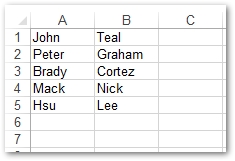
Output
Python API for Excel Text to Column - Get a Free License
You can get a free temporary license to use the Excel Text to Columns feature without evaluation limits.
Conclusion
This guide showed how to automate Excel’s Text to Columns functionality using Aspose.Cells for Python. By defining a delimiter and invoking textToColumns, you can efficiently split any delimited text into multiple columns directly from your Python code.
Python Excel API - Read More
Explore additional capabilities of Aspose.Cells for Python in the official documentation. For questions or support, visit our forum.