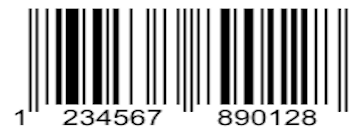
EAN stands for European Article Number, a barcode used to identify products sold globally. It is a 13‑digit unique identifier that appears on many consumer goods such as books, food, and clothing. It is also widely used in automation for several reasons:
Global Recognition: EAN barcodes are recognized worldwide, making it easier to sell products internationally.
Better Inventory Management: Quick scanning reduces errors and simplifies inventory tracking.
Enhanced Product Information: Supplement digits can store extra details like product name, weight, or price.
The following headings discuss EAN barcode generation in detail:
- Python EAN Barcode Generator - Free API Download
- Create EAN 13 Barcode Generator in Python
- How to Create EAN 5 Barcode Generator with Supplement Data using Python
- Generate EAN Barcode Online
- Python EAN 13 Barcode Generator
Python EAN Barcode Generator API - Free API Download
Aspose.BarCode for Python via .NET supports many barcode types, including EAN, Postal, 1D, 2D, QR, and more. Integrate it into your applications by downloading the package or installing it from PyPI with this command:
pip install aspose-barcode-for-python-via-net
Create EAN 13 Barcode Generator in Python
Follow these steps to generate an EAN‑13 barcode in Python:
- Initiate a
BarcodeGeneratorobject and set the encoding to EAN‑13. - Save the generated barcode image with the
savemethod.
The sample code below demonstrates how to create an EAN‑13 barcode:
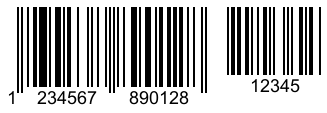
How to Create EAN 5 Barcode Generator with Supplement Data in Python
You can add supplement data to an EAN barcode for extra information. To create an EAN‑5 barcode with supplement data in Python:
- Create a
BarcodeGeneratorobject. - Set the text string and encoding.
- Define supplement details such as space pixels and data.
- Generate the barcode using the
savemethod.
The code snippet below shows how to build an EAN‑5 generator:
The screenshot below visualizes the output barcode:
Generate EAN Barcode Online
Create an EAN barcode online without registration. Visit the app at:
https://products.aspose.app/barcode/generate
Python EAN 13 Barcode Generator - Get a Free License
Evaluate the full API capabilities by requesting a free temporary license.
How to Create Python EAN Barcode - Read More
Explore additional resources to learn about barcode generation with Aspose.BarCode for Python via .NET:
Conclusion
This article explains how to generate an EAN‑13 barcode in Python and how to create other EAN variations with supplement data. For any questions, contact us via the free support forum.